
If you're running a growing business, your HR team is probably still acting as a help desk for things employees should handle themselves. Someone needs a pay stub. Someone changed addresses. Someone wants PTO approved before payroll closes. None of that is strategic, but every one of those transactions can create a compliance problem if it's handled poorly.
That’s why an employee self service system matters. Not because it’s convenient, but because it changes how employee data is captured, approved, stored, and defended when questions come later. For a multi-state employer, that distinction matters.
An employee self service system is often described as software. That’s too narrow. It’s really an operating model for HR.
The simplest analogy is banking. Years ago, people stood in line for routine transactions because the bank controlled access to information and action. Online banking changed that. Customers could update details, transfer funds, and review records directly, while the bank focused on oversight, fraud controls, and higher-value service. ESS does the same for HR.
Instead of routing every basic task through HR, employees handle approved transactions themselves. They update personal details, review pay information, request time off, access forms, and confirm benefits data inside a controlled system. HR stops acting like a clerk and starts acting like a governance function.
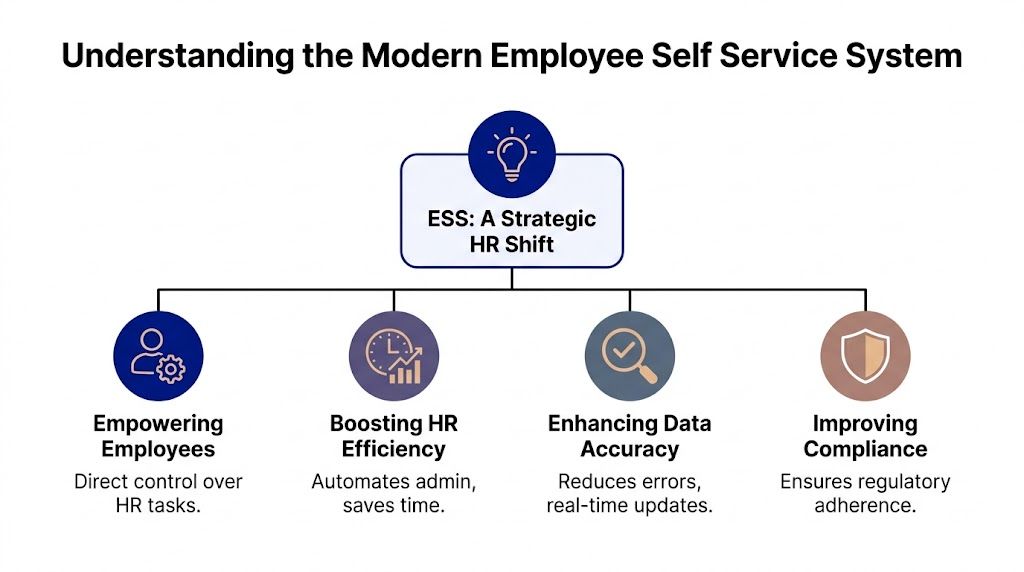
Most owners hear “self-service” and think “less admin.” That’s true, but it misses the more important point. Its primary value is that the system can standardize how information enters your HR environment.
When an employee emails HR to change a bank account, change a tax document, or report a new address, the process is loose. Messages get missed. Attachments sit in inboxes. Approvals aren’t always documented. In a proper ESS setup, the employee submits data through a controlled workflow, and the system records what changed, when it changed, and who approved it if approval is required.
That’s what creates defensibility.
Practical rule: If a people process matters in payroll, benefits, tax withholding, leave compliance, or litigation, it should not rely on email and memory.
This is why ESS should sit inside a broader HR infrastructure, not operate as a standalone convenience app. If you're evaluating the larger system design, this guide to a human resource management system for small business helps frame where ESS belongs.
A modern employee self service system changes responsibility, but it shouldn’t remove accountability. Employees become the source of routine updates. Managers handle approvals where policy requires them. HR defines rules, monitors exceptions, and audits records.
That shift usually improves four things:
Most leaders don’t need more software. They need fewer weak points.
An ESS platform reduces friction only if it also reduces ambiguity. If it merely pushes tasks to employees without validation rules, approval logic, and audit records, it creates a cleaner interface but a messier risk profile. That’s not modernization. That’s decentralizing errors.
A strong employee self service system gives employees independence inside a controlled framework. That’s the standard to use.
Most ESS buying conversations are too shallow. Vendors show a polished dashboard, a mobile app, and a login page. Business owners nod because it looks efficient. The question isn’t whether employees can click through tasks. The question is whether each feature improves control, documentation, and decision quality.

A useful employee self service system should cover the routine work employees expect while protecting the business from sloppy administration. That balance matters. HR professionals clearly see the employee side of the equation. 81% of HR professionals agree that Employee Self-Service technology positively impacts employee engagement, according to Paycom’s findings on ESS engagement.
Some functions are basic. They still matter because they touch records that become evidence later.
Below is the standard I advise leaders to use when reviewing any platform.
| Feature | Good outcome | Risk if poorly implemented |
|---|---|---|
| Payroll access | Employees retrieve records directly and reduce back-and-forth with HR | Old or inconsistent records create pay disputes |
| Time-off workflow | Requests and approvals are documented in one system | Verbal approvals create inconsistent leave records |
| Employee profile updates | Data enters structured fields with validation | Bad addresses or tax details flow into payroll |
| Benefits transactions | Elections are recorded and easier to verify | Enrollment errors become expensive and hard to unwind |
| Policy center | Employees see current guidance in one place | Managers improvise and apply rules inconsistently |
A polished interface matters, but it’s not enough. A mobile-friendly tool that lets employees submit requests quickly can still create serious problems if there’s no approval routing, no validation logic, and no audit record behind the screen.
The best ESS feature is the one that produces a clean, reviewable record when someone challenges what happened.
That’s why I tell clients to test each feature with real scenarios. Don’t ask, “Can employees submit PTO?” Ask, “Can the system show the request, the applicable balance, the manager approval, any edits, and the final status in one record?” That’s a business question, not a software question.
When ESS is built properly, leaders see the benefit in daily operations. HR gets fewer routine interruptions. Payroll has fewer informal corrections. Managers stop guessing where to send employees. Employees stop waiting for documents they should be able to access on their own.
But the more important gain is consistency. A consistent process is easier to train, easier to monitor, and easier to defend. That’s what turns an employee self service system from a convenience layer into a serious business control.
Most ESS content incorrectly portrays self-service as an unqualified win. It isn’t.
The more you decentralize data entry, the more you need rules, approvals, and auditability. That’s especially true when your business operates across state lines. One employee’s “simple update” can affect tax withholding, wage compliance, leave balances, benefits eligibility, and documentation standards.

A useful warning sign comes from this data point. A 2025 SHRM survey found 42% of HR leaders in expanding firms reported compliance incidents tied to self-service data inaccuracies, yet only 18% had audit trails in their ESS, as summarized in Paychex’s discussion of employee self-service efficiency. That gap should concern any owner expanding into new jurisdictions.
Problems rarely start with the software itself. They start with loose configuration.
An employee updates an address in the system. Nobody checks whether the state tax setup needs review. An employee submits a leave request, but the workflow doesn’t reflect the location-specific policy that applies to that worker. A manager approves something inside the system that conflicts with company policy because the platform allows discretion without guardrails.
Those aren’t edge cases. They’re routine operational failures.
Here are common risk points I see:
Many employers assume self-service improves accuracy because employees know their own information best. Sometimes that’s true. But employee-entered data is only reliable when the system validates what matters and routes higher-risk changes for review.
A self-service portal without governance is just a faster way to create defensible-looking mistakes.
That’s why record retention also matters here. If your organization hasn’t tightened its approach to documentation, these employment records retention requirements should be part of the same conversation.
Ask your team these questions:
If the answer to any of those is no, your employee self service system may be increasing exposure while giving leadership a false sense of order.
Don’t let IT or HR buy ESS on usability alone. Multi-state employers need to treat ESS as part of the company’s compliance infrastructure. That means legal defensibility should sit beside user experience on the scorecard.
A clean employee portal is helpful. A controlled system of record is what protects the business.
A defensible ESS platform isn’t the one with the prettiest interface. It’s the one that holds up when payroll is challenged, when a leave decision is questioned, or when a terminated employee claims the company handled records inconsistently.
Too many buying teams focus on three things: price, ease of use, and demo quality. Those matter, but they aren’t enough. Your selection criteria should be built around risk.
Start with architecture. An ESS tool shouldn’t sit off to the side as a disconnected employee portal. It should operate from a reliable data foundation. According to TimeTrex’s explanation of unified ESS architecture, an API-first model with a unified database can cause a 5-7% reduction in payroll errors by reducing silos and pushing updates across the system in real time.
That matters because fragmented systems create contradictions. Payroll sees one address. Benefits sees another. HR has a third version in a spreadsheet. That’s where disputes start.
Use this checklist when evaluating vendors:
A strong vendor can answer hard questions clearly. If they can’t, move on.
| Ask the vendor | Why it matters |
|---|---|
| How are state-specific rules configured and maintained? | Multi-state compliance can’t depend on generic templates |
| What exactly appears in the audit log? | You need a reviewable record, not a vague activity history |
| Which fields require approval before syncing to payroll? | Not every employee update should post automatically |
| How does the system handle corrections and reversals? | Defensibility depends on preserving record history |
| What integrations are native versus custom? | Fragile custom work often breaks silently |
Your platform may be solid, but your selection process still needs context. If you’re comparing broader HR system categories and want an outside market view, this roundup of best HR software for small business UK is useful for seeing how different vendors position workflow, payroll, and employee administration features.
That kind of comparison is helpful, but your final decision shouldn’t come from feature marketing. It should come from a practical review of how the system supports documentation, approvals, and cross-system data integrity.
Buy for the exception, not the demo. Routine transactions rarely hurt you. Bad records during a dispute do.
Vendor selection should never belong to HR alone. Include payroll, operations, IT, and the person responsible for compliance oversight. In some companies, that’s internal HR leadership. In others, it may be an outside advisor such as a specialized consulting firm, which supports leadership teams on defensible HR structure and multi-state risk decisions.
You should also map the system against your compliance software stack. If you’re sorting through broader tools that affect policy, recordkeeping, and workflow controls, this review of 2025 HR compliance software features pricing and benefits can help frame the overlap.
Choose the platform that creates the clearest chain of evidence. If another product looks nicer but requires more manual workarounds, ignore the nicer product. Your ESS should reduce ambiguity, not hide it behind good design.
The next wave of ESS isn’t just self-service. It’s guided action.
Modern platforms increasingly use AI to answer questions, route requests, surface policies, and trigger actions across systems. That can be valuable if it’s controlled well. It can also spread errors faster if leaders treat automation like judgment.

Microsoft’s overview of agentic ESS tools notes that AI-driven ESS agents can reduce HR administrative workload by 22-30% by integrating with enterprise systems and executing tasks autonomously. That’s not trivial. If your HR team is buried in repetitive requests, AI can move basic work out of the queue.
The best use cases are narrow and operational:
That’s useful because HR shouldn’t spend time answering the same low-risk question over and over.
AI can summarize policy. It should not invent policy. It can surface patterns. It should not become the final decision-maker for discipline, termination, or legal interpretation.
That distinction matters even more when analytics enters the picture. Many leaders are now interested in using ESS data to spot turnover signals, process failures, or manager behavior patterns. That’s a legitimate direction, and a resource on predictive analytics in HR can help leaders understand the strategic use case. But predictive insight only works if the underlying data is clean, permissioned, and interpreted by people who understand the employment risk.
Use AI to accelerate process. Use humans to own judgment.
If you adopt AI features inside an employee self service system, insist on a few basics:
AI can make ESS more useful. It can also make bad governance less visible because everything feels smoother on the surface. Don’t confuse frictionless interaction with sound control.
Most ESS failures don’t happen at purchase. They happen after purchase, when the company rushes rollout and assumes the software will impose discipline on its own. It won’t.
A defensible employee self service system needs implementation rules, decision ownership, and ongoing review. The checklist below is the standard I recommend for multi-state SMBs that want efficiency without losing control.
Start with policy and process alignment before anyone gets a login.
Rollout should feel controlled, not rushed.
| Launch task | Why it matters |
|---|---|
| Train managers on approvals | Managers often create inconsistency when they don’t understand workflow rules |
| Give employees specific instructions | People need to know what they can update and what still requires review |
| Publish one policy source | Employees and managers should not pull guidance from email archives |
| Test exception scenarios | Regular transactions are easy. Edge cases expose whether the setup is defensible |
| Confirm audit visibility | HR and payroll need to know how to review changes quickly |
Governance is where the core work sits. Once employees start using the system, you need a review cadence.
Strong governance looks boring in real time. That’s exactly why it protects the business when something goes wrong.
If you want a practical order of operations, keep it simple:
Leaders regularly make the same avoidable mistakes:
A strong employee self service system should make routine HR work easier. It should also make your records cleaner, your approvals more consistent, and your decisions easier to defend. If it doesn’t do those things, it’s not fully implemented. It’s just live.
If your organization is weighing an ESS rollout, cleaning up a weak implementation, or trying to reduce multi-state HR exposure before it becomes a legal problem, Paradigm International Inc. works with leadership teams that need structured, defensible guidance rather than generic HR administration.