A lot of small business leaders reach the same point the same way. Nothing breaks all at once. Instead, one new state hire, one leave request, one payroll correction, and one messy termination file reveal that the old system was never really a system.
That’s when a human resource management system for small business stops being an administrative upgrade and starts becoming a risk decision. If your company is growing, hiring across states, or operating in a regulated environment, the question isn’t which platform has the nicest dashboard. It’s which system helps you document correctly, act consistently, and defend decisions later if someone challenges them.
Many owners hold onto spreadsheets longer than they should because they still “work.” Until they don’t.
The usual pattern is familiar. Employee records sit in one folder, payroll notes live in email, policies are saved in multiple versions, and managers document performance issues differently, if they document them at all. That setup feels manageable at a smaller size. It becomes fragile the moment complexity shows up.
A cloud HR system often enters the conversation because leadership wants speed. Speed matters, but structure matters more. An estimated 3.2 million SMBs in the U.S. now rely on cloud-based HR software, and 69% of users reported reduced payroll processing time while 25% achieved improved legal compliance according to business.com’s HR management market report. The same report notes that 59% of SMBs still use manual solutions for key functions, which explains why so many growing companies end up stuck in a hybrid mess.
The tipping point usually isn’t software fatigue. It’s risk exposure.
A business adds employees in another state. A manager terminates someone with uneven documentation. Payroll has to reconcile conflicting records. Leadership realizes no one can say with confidence which version of a policy was active on a certain date.
Practical rule: If you can’t reconstruct an employment decision from your records, you don’t have a process. You have a memory problem.
That’s why an HRMS decision should sit alongside broader operating decisions about support model, internal ownership, and risk tolerance. For some organizations, that also raises the question of what belongs in-house versus outside expertise, especially when evaluating the advantages of outsourcing human resources.com/post...com/post/advantages-of-outsourcing-human-resources).com/post/advantages-of-outsourcing-human-resources).
A strong HRMS doesn’t just digitize paperwork. It creates a single operating record for the employment relationship.
That means leaders can:
At this point, the decision gets strategic. The right system won’t replace judgment, but it will make good judgment easier to execute and easier to prove.
Before you book demos, stop thinking about features. Start with failure points.
Most small businesses begin selection by asking whether a system has payroll, time tracking, or onboarding. Those functions matter, but they’re downstream questions. The first question is simpler: where are you exposed today?
A risk-aware assessment doesn’t start with what you want the system to do. It starts with what your current setup is failing to control.

Walk through your actual process, not your intended one.
Start with recruiting and move all the way through separation. Look at who touches each step, what documents are created, where they’re stored, and how decisions are approved. This exercise usually reveals that the process varies by manager, office, or urgency level.
Use a simple audit framework like this:
| Stage | What to review | What often goes wrong |
|---|---|---|
| Hiring | Offer letters, compensation approvals, I-9 workflow | Inconsistent forms, missing approvals |
| Onboarding | Policy acknowledgments, tax forms, training assignments | Documents stored in multiple places |
| Active employment | Time records, leave tracking, performance notes | Manager discretion replaces policy |
| Discipline | Warnings, investigations, PIPs | Subjective language, uneven documentation |
| Separation | Final pay steps, termination letters, exit materials | Missing rationale, state-specific errors |
A spreadsheet problem is not always a business problem. Some are just annoying. Others create direct exposure.
Separate issues into categories:
That distinction matters. A weak mobile app may be frustrating. A weak documentation chain can become evidence against you.
If you have employees in more than one state, generic software requirements won’t be enough.
You need to know which workflows vary by location. Final pay timing, paid leave rules, notice requirements, overtime practices, and meal and rest break administration can differ materially. A system that handles “time tracking” may still fail your business if it can’t support location-specific rules or preserve the records needed to defend a wage-and-hour decision.
Here, requirement language should become precise. Instead of “we need onboarding,” the requirement becomes “we need state-specific onboarding packets, signed acknowledgment tracking, and clear retention of completion records.” Instead of “we need timekeeping,” it becomes “we need location-aware time and attendance controls that preserve manager edits and approval history.”
A useful requirement is tied to a business risk. A vague requirement usually leads to a vague buying decision.
The difference between growing companies and stagnant ones often shows up in basic HR discipline. According to SelectSoftware Reviews’ HR statistics summary, fast-growing SMBs are nearly 20% more likely to implement HR best practices. The same source reports that 93% of high-growth companies provide formal I-9 completion training, compared with 67% of stagnant firms.
That gap is instructive. Growth doesn’t make process optional. It makes process visible.
Once you’ve audited your workflows, write requirements in plain language that connects system capability to business protection.
A strong list usually includes items like:
You can add convenience features later. At this stage, you’re identifying what the business cannot afford to get wrong.
Most vendors lead with convenience. Employee self-service. Mobile access. slick onboarding flows. Those can be useful, but they’re not where risk lives.
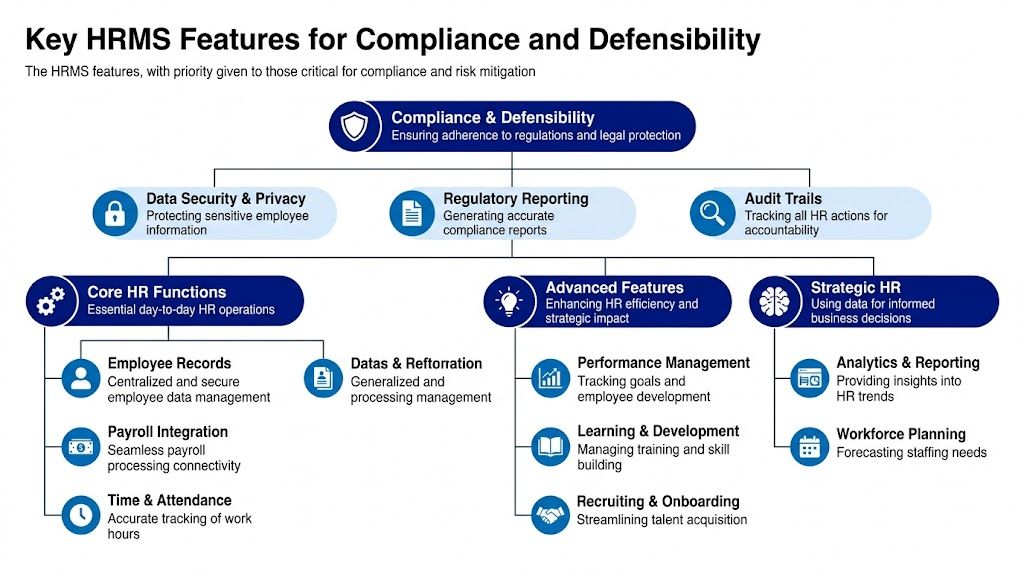
Risk lives in who changed a record, when they changed it, what policy applied at the time, whether managers followed the same process, and whether the company can prove any of that later. For a small business with real employment exposure, those are the features that deserve first priority.
A modern interface doesn’t help much if your records collapse under scrutiny.
For multi-state SMBs, the legal stakes are not abstract. TechnologyAdvice’s HR software analysis notes that DOL audits for multi-state SMBs spiked 18% in 2025, and 40% of wrongful termination suits succeed due to poor records. That same analysis makes the critical point: an HRMS can centralize data without creating defensible practice.
That’s why immutable audit trails belong near the top of your checklist. You need a clear record of edits, approvals, acknowledgments, and timing. If a manager changes a time entry, uploads a warning, or updates a status, the system should preserve that trail.
“Stores documents” is a low bar. The better question is whether the system preserves context around those documents.
Not every useful feature is equally important. For risk reduction, I’d prioritize these first.
Role-based permissions
Managers should only see the information they need. Payroll, medical information, investigations, and compensation records should not be broadly visible. Strong permissions reduce privacy risk and limit accidental mishandling.
Centralized document management with structure
A document repository only helps if it supports consistent categories and naming conventions. You want clear separation between onboarding forms, policy acknowledgments, coaching records, investigation notes, and separation documents.
Template control for sensitive actions
Systems that allow structured forms for warnings, PIPs, and termination support are more useful than systems that accept uploads. The point isn’t to make decisions robotic. It’s to reduce uneven language and missing facts.
Acknowledgment tracking
Policy delivery has little value if you can’t confirm who received what version and when. This matters for handbooks, state supplements, arbitration agreements, and standalone notices.
Compliance update support
A solid platform should help your team keep labor posters, tax forms, and required notices current. It won’t replace legal review, but it should reduce preventable lapses.
Some features are marketed heavily because they demo well.
Self-service portals are helpful. Mobile apps can improve adoption. AI summaries can reduce admin work. None of those should outrank features that preserve evidence, restrict access, and enforce consistency.
Here’s a practical comparison:
| Common buying focus | Better leadership question |
|---|---|
| Easy employee app | Can managers document actions consistently? |
| Fast onboarding flow | Can we prove completion and acknowledgment later? |
| Attractive dashboard | Can we audit changes to records and approvals? |
| Broad customization | Can we control who edits what? |
This is the part many buyers miss. The platform alone won’t make documentation defensible.
If your managers write vague notes, skip follow-up, or use inconsistent reasoning across employees, the software may preserve weak records more efficiently. That’s still a problem. Some organizations pair software with advisory support or stronger operating standards. For example, companies evaluating platform options often compare software lists such as these best HRIS systems, but the stronger decision comes...com/post/best-hris-systems), but the stronger decision comes...com/post/best-hris-systems), but the stronger decision comes from asking how the system supports disciplined use after launch.
Our firm. fits into that conversation as an advisory option for SMB leadership teams that need help around terminations, investigations, documentation standards, and multi-state consistency. That isn’t a substitute for software. It’s a reminder that software and judgment solve different problems.
Ask the vendor to show you one difficult scenario, not one easy one.
For example:
The quality of the answer usually tells you more than the feature list. A strong HRMS for small business doesn’t just complete tasks. It preserves the company’s ability to explain them.
An HRMS rarely fails because the sales demo was bad. It fails because the system didn’t fit the rest of the business.
If payroll data has to be re-entered into accounting, if benefits updates don’t sync cleanly, or if your HR team has to maintain parallel records to work around missing connections, the platform starts creating the very errors it was supposed to prevent. Integration is not a technical bonus. It’s part of operational control.
Start with the systems you already depend on. That usually includes accounting software, payroll tools, benefits administration, learning platforms, scheduling tools, and sometimes case-specific applications for healthcare, professional services, or field operations.
Then ask direct questions:
A platform that “integrates” may only pass a narrow set of fields. That can still leave teams reconciling differences by hand.
You don’t need to be technical to care about APIs. In practical terms, an API determines whether your systems can exchange information cleanly and adapt as your business changes.
If you add a new scheduling platform, switch benefit brokers, or expand into another entity structure, API flexibility helps you avoid rebuilding your workflow from scratch. It also reduces dependence on manual downloads, emailed spreadsheets, and one person who knows the workaround.
A useful vendor conversation sounds less like “do you have an API?” and more like “what can our team connect without custom development, and what happens if our systems change next year?”
Security and integration deserve the same level of review. A broken sync creates errors. A weak security posture creates exposure.
Your HRMS will hold highly sensitive information. That includes Social Security numbers, compensation records, tax forms, benefits data, disciplinary records, and sometimes medical or accommodation information.
Don’t accept broad claims like “bank-level security.” Ask for specifics that a business buyer can evaluate:
This review also tells you something about the vendor relationship. Vendors that take security seriously usually answer these questions clearly. Vendors that avoid detail often create problems later.
Here’s a practical way to evaluate the issue:
| Area | Strong answer | Weak answer |
|---|---|---|
| Integrations | Specific systems, data fields, sync behavior | General claims about compatibility |
| API support | Clear explanation of flexibility and limits | Technical jargon without use cases |
| Access controls | Permission levels by role and function | One-size-fits-all admin setup |
| Security posture | Documentation, encryption, response process | Marketing language only |
A strong system should reduce duplicate entry, limit who can see sensitive data, and support future changes without forcing a platform replacement. If it can’t do those things, the purchase may create a cleaner interface while leaving the underlying risk untouched.
Small businesses often evaluate HR software the wrong way. They compare subscription cost against current inconvenience.
That’s too narrow. A sound evaluation compares current exposure against future control. The right HRMS can improve efficiency, but its deeper value often sits in cleaner execution, better records, and fewer expensive mistakes.

Measure what manual HR administration is already costing you.
That includes the visible labor of payroll corrections, onboarding follow-up, data entry, and report assembly. It also includes the less obvious cost of delays, inconsistent manager practices, and time spent reconstructing records when a question arises.
Checkr’s overview of small business HR software reports that an HRMS can deliver a 2-3x ROI by reducing manual HR tasks by 60% and compliance risks by 40%. For a 50-employee firm, that can translate to $20,000 in annual savings, and 78% of adopters achieve payback in less than 12 months. The same source also warns that 30% of projects fail due to poor integration.
That last point matters. ROI isn’t just about buying software. It’s about buying software that your operation can absorb.
A credible business case usually has three layers.
These are the easiest to identify.
This is harder to quantify, but often more important.
Think about the cost of poor records during a termination dispute, a wage complaint, or an agency inquiry. Even where the company ultimately prevails, weak documentation drives management time, outside review, and reputational strain.
A cheaper system can become the expensive option if it forces side processes, extra admin work, or weak documentation controls.
A platform should reduce the likelihood that you need to replace it too soon.
If growth is likely, evaluate whether the system can handle additional states, more formal manager workflows, stronger reporting, and more complex access controls without a major rebuild. That’s one reason many leadership teams compare software architecture decisions alongside custom vs. off-the-shelf HR.com/post/custom-vs-off-...com/post/custom-vs-off-the-shelf-hr).com/post/custom-vs-off-the-shelf-hr).
The monthly fee is only part of the cost.
Review implementation fees, training, support tiers, add-on modules, and charges tied to payroll, benefits, reporting, or compliance tools. A platform can look affordable until key controls sit behind extra modules or vendor services.
If you want a practical benchmark for comparing how vendors package cost, this overview of HRMS pricing models is useful because it helps buyers understand how base fees, per-employee charges, and modular pricing can change the true cost picture.
Use a structure like this when comparing vendors:
| ROI area | Questions to answer |
|---|---|
| Admin time | How many hours per pay cycle or month does the current process consume? |
| Error reduction | Where do corrections, reruns, or duplicate entries happen today? |
| Compliance support | Which risks become easier to monitor, document, or audit? |
| Scalability | Will the system still work if headcount or state footprint grows? |
| Hidden cost | Which features require add-ons, outside tools, or manual workarounds? |
A good HRMS investment case doesn’t claim that software solves every people issue. It shows that better systems reduce friction, improve consistency, and make expensive mistakes less likely.
Selection is visible. Implementation is where most projects succeed or fail.
A small business can choose a capable platform and still end up disappointed if data is messy, ownership is unclear, or managers aren’t trained on the behaviors the system is supposed to support. The implementation plan needs to be operational, not just technical.

Teams often want the pain to stop quickly, so they try to launch everything at once. That usually increases confusion.
A more durable approach is phased rollout. Rippling’s HRMS implementation guidance notes that 40% of small firms experience payroll errors with manual systems and recommends starting with an audit of current processes. The same guidance warns that 25% of implementations fail due to poor integration and 35% of firms incur rework costs from ignoring scalability.
That’s why I prefer a phased model for small and multi-state businesses.
Begin with the areas where inconsistency creates the most risk.
For many businesses, that means:
This first phase should prove that the system can hold accurate data, support key approvals, and preserve records reliably.
Migration gets underestimated because it sounds administrative. It’s a control exercise.
Before importing data, review the quality of what you already have. Clean up duplicate employee files, outdated titles, missing acknowledgments, inconsistent naming conventions, and stray records stored outside the main process. If your old system contains conflicting information, the new system will preserve those conflicts more neatly.
Use a migration checklist such as:
| Migration area | Validation question |
|---|---|
| Employee data | Are names, job data, and locations accurate and current? |
| Documents | Are files complete, correctly labeled, and assigned to the right employee? |
| Policies | Do you know which versions remain active and which should be archived? |
| Permissions | Have you defined who can view, edit, approve, and export data? |
This is one of the biggest gaps in HRMS launches.
Managers usually get trained on where to click, how to approve, and where to upload files. That’s necessary, but it’s not enough. If the organization wants defensibility, managers also need training on what good documentation looks like.
That includes:
The system can standardize the container. Your managers still determine the quality of what goes inside it.
Every implementation needs one internal owner with authority to make decisions, coordinate with the vendor, and manage internal follow-through.
Without that, questions linger, deadlines slip, and configuration choices get made reactively. The project lead doesn’t need to be technical. They do need to understand your workflows, know where decisions require leadership input, and keep the rollout tied to business priorities.
A strong implementation doesn’t rush to “go live.” It creates a stable operating environment where records are accurate, access is controlled, and documentation standards start on day one.
An HRMS is not self-managing. Once it goes live, governance becomes part of the job.
That means someone should review user permissions regularly, confirm that former managers and departed employees no longer have access, and check whether documentation practices are still being used consistently. If the system contains good workflows but managers have drifted back into side emails and offline notes, your risk problem hasn’t been solved.
The easiest way to lose control is to treat the platform as finished.
Create a recurring review cycle that covers:
These reviews don’t need to be elaborate. They do need to happen.
Some vendor behaviors tell you early that the relationship may become costly later.
Watch for these warning signs:
A good vendor knows software supports compliance work. It doesn’t replace management discipline, legal review, or sound judgment.
If a vendor oversells certainty, assume they’re underselling the limits of the tool.
Service terms matter too. Review support responsiveness, escalation paths, data export rights, and uptime commitments carefully. For many businesses, an SLA with 99.9% uptime or higher is a reasonable baseline expectation when the platform sits inside payroll, records, and approvals.
The strongest small business setups treat the HRMS as part system, part governance process. That’s what keeps the software useful after launch, and that’s what keeps leadership in control when the business changes.
If your team is evaluating a human resource management system for small business and wants to approach the decision through the lens of documentation, compliance, and defensibility, Our firm works with SMB leaders navigating multi-state g...com/contact) works with SMB leaders navigating multi-state g...com/contact) works with SMB leaders navigating multi-state growth, sensitive employment decisions, and higher-risk HR environments. It’s a practical next step if you want clearer standards before you commit to a platform.