You’ve extended an offer. The candidate said yes. Now there’s a short stretch of time where enthusiasm can either deepen or fade.
That’s why the new employee welcome email matters more than most leaders think. It isn’t just a courtesy note. It’s your first operational handoff, your first culture signal, and in many businesses, your first piece of onboarding documentation that can either support a smooth start or expose gaps you didn’t realize were there.
Many businesses treat the welcome email as a friendly extra. In practice, it functions more like an early control point in onboarding. It confirms the organization is prepared, gives the employee a clear path forward, and reduces the uncertainty that often appears between offer acceptance and day one.
That matters because early communication shapes how a new hire interprets your competence. Research summarized by AIHR’s employee onboarding statistics found that 84% of new hires said pre and post day-one communications, including welcome emails, were beneficial for building early relationships. The same source notes that companies with structured onboarding programs retain 58% of employees for at least three years.
The period after acceptance is often where preventable problems begin. A candidate may still be hearing from other employers. They may have practical questions they hesitate to ask. They may also start wondering whether your internal team is coordinated.
A strong new employee welcome email closes that gap quickly. It answers obvious first questions before anxiety builds. It also gives the employee something concrete to reference instead of relying on memory from the offer conversation.
Practical rule: If a new hire has to email you basic first-day questions that should have been answered upfront, the process is already too loose.
The welcome email does two jobs at once. It should feel human, but it also needs to signal that your company runs a disciplined operation. That combination matters, especially for smaller organizations that are growing quickly or hiring across locations.
The best emails create immediate clarity around:
Teams that are trying to improve team communication often focus on meetings and messaging tools. They should also look at onboarding messages. A clear welcome email is one of the earliest signals employees receive about how information will be handled inside the business.
For owners and operators, the welcome email becomes a more critical consideration. The welcome email is often the first written communication after acceptance that lays out expectations, logistics, and policy direction in one place. That makes it useful beyond simple hospitality.
Used properly, it helps you:
A casual email that says “glad to have you” isn’t wrong. It’s just incomplete. The better standard is a message that welcomes the employee, reduces confusion, and leaves a clean record that your organization communicated promptly and clearly from day zero.
A strong new employee welcome email should be easy to read and hard to misinterpret. Most failed versions go wrong in one of two ways. They’re either so casual that they omit critical information, or so overloaded that the employee skims past what matters.
The cleanest way to build one is around four pillars: logistics, people, culture, and compliance.
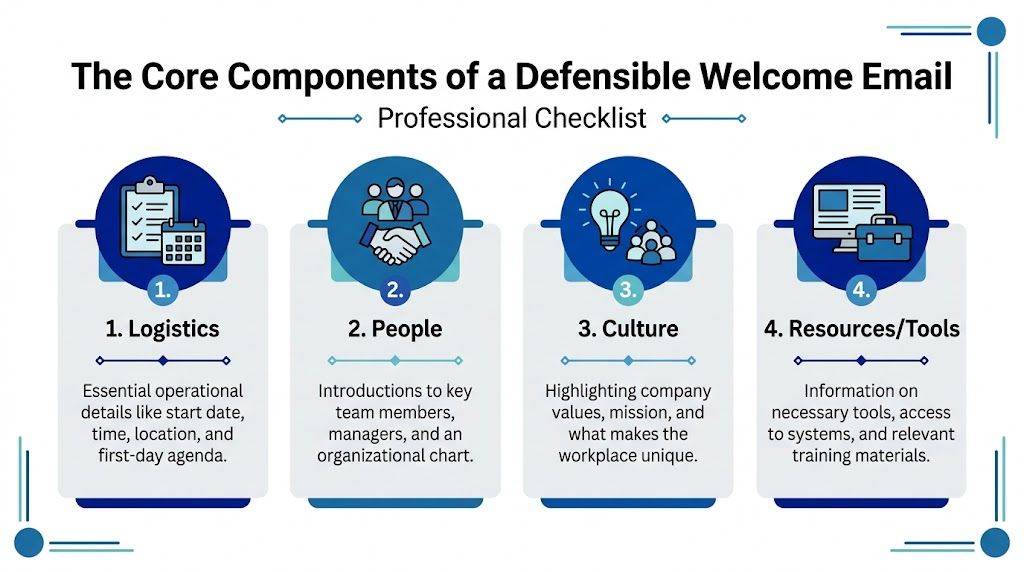
Start with the practical details. This is the information the employee will search for the night before day one.
Include:
If the employee is remote, swap parking and front-desk details for shipping status, login instructions, equipment setup expectations, and where to go for technical support.
A welcome email should reduce social ambiguity. New hires don’t just want instructions. They want to know who they’re walking toward.
This section can be brief, but it should identify the people who matter most:
One practical improvement is to send the email through your HR system while making the sender appear personal and role-specific. The technical setup matters too. Guidance collected in welcome email best practices recommends HTML-responsive design with a 600px maximum width and 14 to 16px font, plus ATS integration to reduce manual errors by 90%. The same source notes that automated welcome email series have been shown to improve 6-month retention by 37%.
Often, many teams overdo it. The goal isn’t to squeeze your entire employer brand into one message. The goal is to help the employee understand how your company works.
A few lines are enough:
A useful welcome email sounds organized and sincere. It doesn’t sound like marketing copy written about your own company.
If your team needs help tightening the writing itself, this guide on how to send the perfect email to get the response you want is a useful reminder that clarity and structure drive action more than clever phrasing.
This is the pillar generic templates usually miss. A defensible welcome email should direct the employee to the policies and notices that matter without turning the message into a legal memo.
At minimum, include:
A good test is simple. If a manager sent this email without HR review, would it still be accurate, complete, and safe to save in the employee file? If the answer is no, the template needs work.
The tone of a new employee welcome email should feel warm, but it also needs boundaries. This isn’t a text message from a friend. It’s an official company communication that may later sit alongside policy acknowledgments, onboarding records, and personnel documentation.
That’s why the safest tone is confident, clear, and genuinely welcoming. You can be enthusiastic without sounding loose. You can be friendly without relying on slang, jokes, or exaggerated promises.

Strong body copy sounds like an organized manager speaking directly to a new hire. It uses plain language, short paragraphs, and direct instructions. It doesn’t bury key actions inside long greetings.
A reliable tone includes:
What usually doesn’t work:
Subject line quality matters because this email arrives when attention is highest. According to welcome email performance statistics, new employee welcome emails have an average open rate of 68.6%, with some studies showing rates as high as 80%. That’s far stronger than standard internal communications, which is exactly why the message should be written carefully.
Here are subject line patterns that usually perform well:
| Subject line approach | Example |
|---|---|
| Personalized welcome | Welcome to [Company], [First Name] |
| Action-oriented | Your First Day Details at [Company] |
| Balanced warmth and clarity | Welcome to the Team, [First Name] |
| Manager-led | A Welcome from Your Manager at [Company] |
Keep the subject line specific enough to signal importance, but plain enough that it looks legitimate and easy to trust.
One caution. Subject lines should create attention, not uncertainty. Avoid vague lines like “Important Update” or “A Quick Note,” which force the recipient to guess. The best welcome email subject lines tell the employee exactly what the message is and why it matters.
Most advice on the new employee welcome email focuses on tone, templates, and first-day excitement. That’s useful, but it misses the risk that grows as soon as a business hires across state lines. A one-size-fits-all message can create real exposure if it ignores jurisdiction-specific obligations.
That risk isn’t theoretical. Guidance summarized by Indeed’s new employee welcome email examples notes that most welcome email templates ignore critical multi-state compliance risks. The same source highlights that California’s AB 1003 requires pay rate disclosure upon hire, 22 states have new hire reporting mandates, and a 2024 SHRM survey found 41% of multi-state SMBs faced fines from onboarding lapses.

A generic template assumes all hires need the same message. That’s rarely true once you operate in multiple jurisdictions, use remote workers, or maintain different handbook addenda by state.
Common gaps include:
If you employ remote staff across locations, your onboarding communication should align with your broader remote worker compliance across multiple states process. Otherwise, the welcome email may be the first place inconsistency shows up.
The answer isn’t to overload the message with policy text. A better approach is to keep the email readable while directing the employee to the right documents and acknowledgments.
A practical model looks like this:
| Area | Better approach |
|---|---|
| Pay and classification notices | Refer the employee to the required disclosure or attach the approved form where needed |
| State handbook language | Link the employee to the applicable addendum, not every policy in your library |
| Required acknowledgments | Use one clear instruction on what must be reviewed and completed before or on day one |
| Questions route | Name a single HR contact for policy and documentation questions |
This matters as much as what you include. Managers often try to sound reassuring and accidentally create language that is too broad.
Avoid phrases that imply:
The welcome email should support compliance, not compete with your formal documents.
A good final check is to ask whether each sentence would still make sense if reviewed later during a dispute, audit, or internal investigation. If a line sounds vague, overly personal, or inconsistent with policy, remove it.
Templates are useful when they save time without lowering standards. The problem is that many welcome email templates are written to sound pleasant, not to operate well in a real business. The best version is one your team can reuse consistently while still adjusting for role, location, and work model.
If your onboarding process still lives across email drafts, scattered checklists, and manager memory, tighten that first. A documented sample new hire checklist helps keep the welcome email aligned with everything else that should happen before day one.
Subject: Welcome to [Company], [First Name]
Hi [First Name],
We’re pleased to welcome you to [Company] as our new [Job Title]. Your start date is [Start Date], and we’re looking forward to supporting a smooth first day.
Please report to [Office Location] at [Time]. When you arrive, ask for [Contact Name and Title]. Your first day will include introductions, onboarding paperwork, and an overview of your role and schedule.
Please bring [required items]. Your manager, [Manager Name], will meet with you on day one. If you have any questions before your start date, contact [HR Contact] at [Email].
Before your first day, please review and complete the items in [portal or attachment], including the employee handbook and any required acknowledgments that apply to your position and location.
We’re glad you’ll be joining the team.
Best,
[Sender Name]
[Title]
This version works because it is direct. It covers timing, location, contact ownership, and pre-start action without sounding cold.
Subject: Welcome to [Company], [First Name]. Your Remote Onboarding Details
Hi [First Name],
Welcome to [Company]. We’re pleased to have you joining us as [Job Title].
Your first day is [Start Date]. You’ll begin by joining [video platform] at [Time Zone and Time] using this link: [link]. Your manager, [Manager Name], and [HR or onboarding contact] will walk you through the schedule for your first day and first week.
Your equipment [has shipped / will be delivered by / is ready for pickup], and your login instructions will be sent through [system or IT contact]. If you have any access issues, contact [IT Contact] at [Email].
Please review the attached or linked onboarding materials before your start date, including the handbook, remote work expectations, and any state-specific notices that apply to your work location.
We’re looking forward to working with you and making your first week as clear and organized as possible.
Best,
[Sender Name]
[Title]
This template is stronger than a generic remote welcome because it addresses the practical friction points remote hires face: access, equipment, timing, and support routing.
Subject: Welcome to [Company]
Hi [First Name],
I wanted to personally welcome you to [Company]. We’re glad you’ve chosen to join us as [Job Title].
You were selected because your background and judgment align with what this role requires, and we’re looking forward to the contribution you’ll make here. [Manager Name] and our onboarding team will guide you through the details of your first week, and you’ll receive the materials needed to get started.
We’re pleased to have you on board and look forward to meeting you soon.
Best regards,
[Leader Name]
[Title]
A leader note should stay short. Its job is symbolic, not operational. Let HR or the manager carry the details in the main new employee welcome email so ownership stays clear.
Execution is where good intent often slips. The strongest template still fails if it goes out late, comes from the wrong sender, or never gets stored with the rest of the onboarding record.
A structured methodology summarized by GPAC’s guidance on welcome emails to new employees recommends sending the message within 24 hours of offer acceptance. The same source notes that delays greater than 48 hours can cause a 22% increase in new hire doubt about the organization’s commitment, and emails sent by a direct supervisor are correlated with a 25% higher 90-day retention rate.
Use a final send checklist like this:
A welcome email should be easy to send, but it should also be easy to prove was sent, what it contained, and when the employee received it.
A well-built process does both. It welcomes the employee and protects the business.
If your leadership team is building onboarding processes that need to be both clear and defensible, Paradigm International Inc. can help you tighten communication standards, documentation practices, and multi-state onboarding controls without making the employee experience feel mechanical.