


A payroll issue often starts small. A raise was approved but entered late. Overtime was paid at the wrong rate. A manager changed someone’s classification, but payroll didn’t catch up until the next cycle.
That’s when business owners ask, what does retro pay mean, and the answer is more than “money owed later.” It means you already have a compensation error on your books, and if you operate across states, that error can become a wage-and-hour problem fast. The businesses that handle retro pay well don’t just fix the number. They document the reason, validate the calculation, and issue the correction in a way they can defend later.
Retro pay means compensation you owe an employee because you paid them incorrectly for work they already performed. The employee was paid, but not at the correct rate or amount.
Consider correcting an underbilled client invoice. You already sent the invoice, but the pricing was wrong, so you issue an adjustment for the difference. Payroll works the same way. Retro pay is the adjustment that fixes the underpayment.
A common example is overtime. Federal law requires overtime at 1.5 times the regular hourly rate for hours over 40 in a workweek, and TriNet’s explanation of retroactive pay and overtime corrections notes that payroll errors often trigger retro pay when employers pay straight time instead of the overtime premium. That matters because the U.S. Department of Labor recovered $236 million in back wages for 147,000 workers in 2023, with overtime violations representing 68% of total FLSA recoveries that year, according to the same TriNet resource.
Retro pay is not a catch-all term for any money owed to an employee. If your team confuses it with back pay or arrears, your payroll handling will get sloppy.
| Term | Definition | Common Scenario |
|---|---|---|
| Retro Pay | A correction for an underpayment on work already paid, but at the wrong amount | A raise was approved effective last month, but payroll applied it this pay period |
| Back Pay | Wages that were not paid at all, or were unlawfully withheld | An employee should have been paid for time worked but wasn’t |
| Arrears | Pay handled after the period in which it was earned, often by design | A company pays current wages one payroll cycle behind |
Those distinctions matter because each one can trigger different legal and operational issues. Retro pay usually starts with an administrative error. Back pay often points to a more serious wage violation. Arrears may be part of the company’s payroll structure, but it still has to comply with wage payment laws.
For a business owner, retro pay usually signals one of four things:
Practical rule: If you need to issue retro pay, treat the payment as the end of an investigation, not the beginning of one.
That mindset matters. FLSA Section 11(a) requires employers to maintain accurate payroll records for 3 years, and sloppy reconstruction after the fact is a weak position if a regulator or plaintiff’s attorney starts asking questions. Retro pay isn’t just a payroll correction. It’s evidence of whether your business controls compensation risk or reacts to it.
Most retro pay doesn’t come from a dramatic event. It comes from ordinary business activity handled without enough discipline.

A manager approves a raise by email. HR updates the employee record. Payroll misses the effective date. The employee is paid, but underpaid. Now you owe retro pay.
That pattern repeats in different forms across growing companies, especially when payroll, HR, and operations don’t work from one controlled process.
This is the cleanest retro pay scenario and one of the most common.
An employee gets promoted effective the first day of the month, but the pay increase isn’t entered until the second payroll after that date. You don’t owe an estimate. You owe the exact difference between what should have been paid and what was paid for the affected periods.
This gets messy fast when managers communicate pay changes informally. If effective dates live in Slack, email, or verbal conversations, payroll teams end up guessing.
Retro pay then becomes more than an administrative fix. It becomes a wage-and-hour exposure issue.
The problem isn’t just that overtime was missed. It’s often that the employer used the wrong underlying rate, paid straight time for overtime hours, or failed to account for state-specific overtime rules. For multi-state employers, that risk grows because 27 states have overtime laws exceeding the federal minimum, including California’s daily overtime after 8 hours, as noted in TriNet’s retro pay guidance linked earlier.
If your business hasn’t pressure-tested classification and overtime rules, review the downstream risk of employee misclassification penalties. Retro pay is often the symptom. Misclassification is often the root cause.
A new hire starts mid-cycle. A transferred employee moves into a different pay structure. A clinic administrator changes a shift differential. Payroll applies the wrong rate for one or more periods.
These mistakes often happen in businesses with multiple locations and inconsistent approval workflows. One site uses a spreadsheet. Another uses an HRIS note. Payroll receives incomplete information and processes what it has.
The issue isn’t complexity alone. It’s lack of control over how pay changes are initiated and confirmed.
Sometimes the trigger is internal. A payroll review finds that an employee or group of employees was underpaid across several periods.
That’s common after:
Fixing the pay without documenting the cause is an incomplete correction.
When you uncover a retro pay issue in an audit, preserve the timeline. Record when the error started, who identified it, which employees were affected, how the calculation was built, and when the correction was approved. That file matters if the issue later turns into a broader pay dispute.
If your calculation is wrong, your correction is wrong. That sounds obvious, but many employers still treat retro pay as a rough adjustment rather than a precise wage correction.
That approach is risky. You need a method you can explain, replicate, and support with records.
Start with the simplest version. Determine:
For overtime errors, use the difference between the correct overtime rate and the paid rate, then multiply by the affected overtime hours.
Formula for hourly overtime correction
Retro Pay = (Correct OT Rate - Paid Rate) × Excess Hours × Affected Periods
A practical example appears in Indeed’s explanation of retro pay meaning and compliance risk. For a $25/hour employee underpaid overtime across 4 weeks with 80 excess hours, retro owed equals ($37.50 - $25) × 80 = $1,000.
That example is useful because it shows the right logic. You’re not guessing at a lump sum. You’re reconstructing what payroll should have done in the first place.
TriNet also gives a simpler overtime scenario. An employee works 44 hours and is paid $20/hour for all hours instead of receiving the correct overtime treatment for the extra 4 hours. The retro pay owed is calculated as ($30 x 1.5 - $20) x 4 = $80, based on the TriNet resource cited earlier.
Ignore the formatting oddity in the example and focus on the principle. Overtime errors require you to revisit the actual regular rate and then calculate the underpaid premium correctly.
Before approving the payment, verify these points:
A payroll team that skips one of those checks can issue a correction that still underpays the employee.
Salaried retro pay usually comes from delayed raises, promotions, or compensation changes with an earlier effective date.
The basic method is straightforward. Find the annual salary difference, divide it by the number of pay periods in the year, then multiply by the number of affected periods.
Formula for salaried retro pay
Retro Pay = (New Annual Salary - Old Annual Salary) ÷ Number of Pay Periods × Affected Pay Periods
Lattice’s guide to what retro pay is and how it works gives a clean example. If an employee’s salary increases from $60,000 to $66,000 effective two biweekly periods ago in a 26-pay-period year, the annual difference is $6,000. Divide that by 26 to get $230.77 per period, then multiply by 2. The retro pay owed is $461.54.
That’s the correct approach for a standard delayed raise.
Many employers get lazy here. They apply the full period difference even when the effective date falls mid-period.
Don’t do that.
If the change took effect during part of a pay period, prorate the difference based on the days affected. The verified guidance allows a day-based approach for more complex salary situations. That keeps the calculation tied to the actual effective date instead of payroll convenience.
For more complex salary corrections, Homebase notes that a $60,000 to $70,000 salary adjustment effective 3 months prior can produce about $2,885 in retro pay when prorated across the affected time period, according to its retro pay overview.
That example matters for one reason. It shows how quickly a seemingly modest delay can create a meaningful correction amount, especially when the issue sits unresolved for multiple cycles.
For salaried employees, the retro amount may affect more than wages. Corrected base compensation can also affect related items like retirement contributions if your plan calculations rely on compensation figures.
If your payroll system doesn’t automatically push corrected wages through connected deductions or benefit formulas, someone needs to review that manually. Otherwise, you fix one error and leave another behind.
The best retro pay calculation is the one an outside reviewer can rebuild from your file without asking what you meant.
That means your documentation should include:
If any of those elements are missing, the process isn’t defensible. It’s just patched.
Once you calculate retro pay, the next mistake is treating it like a side payment. It isn’t. It runs through payroll and affects tax withholding, wage reporting, and sometimes benefits administration.

Retro pay is still wages. That means it must be processed through your payroll system with the same level of control you would use for any other compensation event.
Retro pay for salaried employees can include more than a simple wage adjustment. Homebase notes that corrected compensation may also require benefits recalibrations like 401(k) contributions on corrected base pay, and gives the example that a $60,000 to $70,000 salary adjustment effective 3 months prior can yield about $2,885 in retro pay, while warning that multi-state timing rules still require compliance mapping in parallel with payroll processing.
That matters because the payment itself is only part of the correction. Your payroll team may also need to review deductions, employer contributions, and downstream reporting.
There isn’t one universal answer. What matters is consistency, timing compliance, and a clear audit trail.
A separate check can help when:
Rolling retro pay into the next payroll can work when the issue is identified quickly and the timing is still compliant. But if your business operates in multiple states, convenience should never override statutory payment deadlines.
Payroll teams often own the mechanics, but finance should validate the tax treatment and reconciliation if the correction is substantial or touches multiple periods.
If you want a plain-English refresher on the broader responsibilities involved, this overview of what a tax accountant does is useful context for understanding where payroll corrections intersect with tax reporting and financial review.
For companies tightening internal controls, this is also the point where payroll workflow design matters. A streamlined process reduces preventable errors before they become correction projects, which is why many operators benefit from reviewing practical payroll design issues in this guide to streamlining your payroll process efficiently.
Payroll accuracy isn’t finished when the gross retro amount is correct. It’s finished when the payment, deductions, records, and reconciliation all agree.
The amount owed in retro pay usually isn’t the biggest problem. The legal exposure is.
A single-state employer can still make a mess of payroll, but multi-state businesses deal with different wage payment deadlines, overtime rules, final pay rules, recordkeeping expectations, and enforcement climates. That’s why a routine correction can turn into a compliance event.
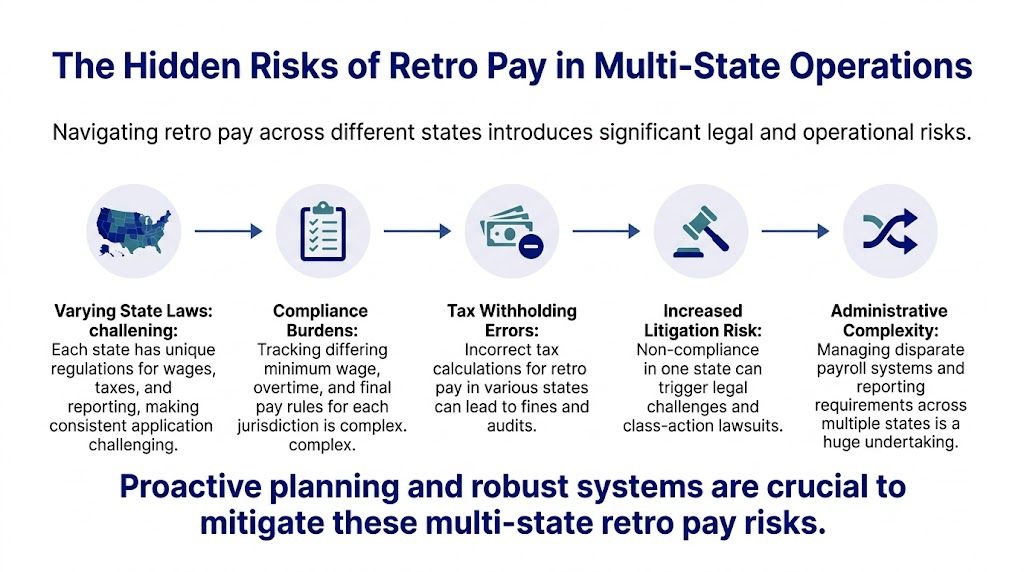
Federal law under the FLSA requires prompt payment, but that doesn’t save you from stricter state rules. Paycor’s discussion of retro pay notes that 28 states impose stricter timelines, and a 2025 SHRM survey found 62% of HR leaders in multi-state firms cite payroll compliance as their top litigation fear in this area of risk (Paycor).
That fear is justified. Once your company operates across jurisdictions, “we’ll fix it next run” stops being a harmless payroll phrase.
California is the obvious example because the state is unforgiving on wage timing and overtime. But it isn’t the only state that creates urgency. Some states expect near-immediate correction. Others attach meaningful penalties when wages aren’t paid on time. If your payroll team applies one default timing rule to every employee nationwide, you’re inviting avoidable trouble.
Most articles answer what does retro pay mean as if it’s just a math question. It isn’t.
For a growing company, retro pay sits at the intersection of:
When one of those breaks, the others usually follow. A delayed raise can expose weak approvals. A missed overtime correction can expose bad timekeeping. A late payment can expose that no one mapped state-specific rules in the first place.
If you have employees in California, you also need to understand the broader wage framework around exempt and salaried workers because payroll mistakes rarely stay isolated. This practical overview of California labor laws for salaried employees is a useful companion when evaluating state-specific compensation risk.
Indeed’s compliance discussion warns that in multi-state operations, failure to remit retro pay within required state deadlines can trigger liquidated damages up to double the underpaid amount. That changes the decision-making immediately.
You’re no longer looking at a payroll correction only. You’re looking at:
In a multi-state environment, delay is often more dangerous than the original error.
This is why owners and COOs need to stop treating retro pay as a back-office nuisance. It’s a control issue. If your systems can’t identify where the employee worked, which rule applied, when the correction became known, and when it was paid, you don’t have a payroll process. You have a liability pipeline.
The hidden risk isn’t just legal complexity. It’s fragmented ownership.
HR may approve the change. Payroll may process it. Operations may know the actual hours worked. Finance may see the reconciliation problem. Nobody owns the full correction lifecycle.
That gap is where multi-state exposure grows. Once a company crosses state lines, payroll corrections need centralized standards, not location-by-location improvisation.
A good retro pay process doesn’t promise perfection. It creates a clean path for catching, correcting, and documenting errors before they escalate.

The strongest businesses handle retro pay like a controlled compliance event. They don’t rely on memory, verbal approvals, or payroll heroics.
Indeed’s retro pay compliance guidance states that quarterly automated payroll audits have reduced audit findings by 65% in benchmarked SMBs, and it warns that failure to pay within state deadlines can trigger liquidated damages up to double the amount. That’s enough reason to formalize this process if you haven’t already.
Use these controls as your baseline:
A retro pay file should answer the obvious questions without forcing anyone to hunt for context.
Include:
That last point matters more than many employers think. Employees usually react better to payroll errors when the company explains the fix clearly and promptly. Silence creates distrust. Confusion creates escalations.
Payroll software can help with simulations, change tracking, and audit trails. HRIS workflows can improve handoffs. ERP logs can help show who changed what and when.
But software doesn’t create compliance by itself. Someone still has to verify the rate logic, validate the state rule, and approve the correction.
A system is only defensible if your team can explain the decisions made inside it.
That’s the standard owners should hold their teams to. If payroll, HR, and operations can’t walk through a retro pay correction start to finish with matching records, the process isn’t mature enough for a multi-state business.
Sometimes yes. A separate payment can make the correction easier to explain and easier to track. It’s often the better choice when timing is urgent or the adjustment is significant. The right decision depends on the applicable state deadline and whether your payroll records will stay clean.
No. Retro pay corrects an underpayment where the employee was paid, just not correctly. Back pay usually refers to wages that were not paid at all or were unlawfully withheld. Confusing those terms can lead to bad handling and bad documentation.
It can. If benefit calculations depend on compensation, corrected pay may require related adjustments. Review retirement contributions and any payroll-linked benefit formulas when the retro amount changes compensation that feeds those calculations.
Keep enough documentation that another reviewer can reconstruct the error, the calculation, the approval, and the payment date without asking for background. If your file only shows the final dollar amount, it isn’t sufficient.
Delay. The original payroll error is often fixable. The bigger problem is waiting too long, using inconsistent state rules, or issuing a correction without a clear audit trail.
Leadership should step in when the issue affects multiple employees, crosses state lines, touches classification or overtime rules, or suggests a system problem rather than a one-off entry mistake. Those aren’t payroll-only issues. They’re business risk issues.
If your organization is dealing with retro pay questions, multi-state payroll exposure, or documentation gaps that could become legal problems, Paradigm International Inc. can help you assess the risk, tighten the process, and make your compensation practices more defensible without adding unnecessary complexity.


